Looking toward the Indigo finish line

>> Saturday, May 28, 2011

This week, the Eclipse and Equinox projects released 3.7RC3.  For the past month, we have been in end game mode.  This means that make release candidates available about once a week, each with progressively stringent requirements to release a fix. All code changes require approval as follows

RC1 - Another committer must +1 your bug before you can submit a change.
RC2 - Two committers must +1
RC3 - Two committers and a component lead must approve.
RC4 - Two component leads must +1 your bug. A component lead can veto your change. Steve Northover coined the term intergalactic approval for a bug fix at this stage of the game.


Image © lrargerich, http://www.flickr.com/photos/lrargerich/4999906554/ licensed under Creative Commons by-nc-sa 2.0 

During this entire period, documentation changes can go in without approval.   During RC3 and later, all code changes must be announced to our project's release engineering mailing list to communicate to the other committers that you intend make a change.

There are some interesting parallels between the Eclipse end game and long distance running.  This weekend, 40,000 runners and 100,000 spectators will participate in Otttawa's Race weekend.   The week before their race, athletes participating in the longer distances will taper their runs.  In other words, their training mileage drops significantly so that they're well rested for race day.


Image © Gamma-Ray Productions, http://www.flickr.com/photos/29143375@N05/3574211684/ under Creative Commons by-nc-sa 2.0 


At Eclipse, the process is similar.  We taper our bug fixes as we approach release day. Eclipse is known for it's stable and predictable releases. At lunch yesterday,  my committer colleagues remarked that some of their dependencies (not Eclipse projects) just release at regular intervals and and don't have a ramp down process.  Other projects release occasionally and then don't have a release for several years.  No predictable release schedule.  At Eclipse, we are predictable and stable.  Some may call that boring, but it allows other projects and products who depend us to consume us at regular intervals.  Eclipse 3.7 is especially stable this year given that many committers have been busy releasing innovative new features to Orion and Eclipse 4.1.

We also have weekly test days where the committers and community test the builds and ensure that there aren't any regressions that were recently introduced.  For example, here is the PDE team's test plan. 

In addition to reducing the amount of changes we release to the build,  to ensure the stability of the code base, this tapering of bug fixes and the associated approval process also ensures that other committers have a chance to evaluate our patches.  This sanity check ensures that the fixes are both significant enough to warrant releasing to the build at this time and technically correct.  I can't speak for other committers, but at this stage of the Eclipse release, we are all a bit tired.  So it's good to have several sets of eyes looking at your patch.

Committer after Indigo release


Image © kaibara,http://www.flickr.com/photos/kaibara/4068996309/ licensed under Creative Commons by-nc-sa 2.0 

At this stage of the game, only serious bugs are fixed.  It's not worth causing ripples within the code to fix a minor bug only to find out after the release is available that this fix had intended consequences.


Image © Marc Dezemery, http://www.flickr.com/photos/mdezemery/295687769/ licensed under Creative Commons by-nc-sa 2.0

What process does your project use to ensure that your code base is ready for release?

Further Reading
Eclipse 3.7 Endgame plan

Read more...

SDK code coverage with JaCoCo

>> Monday, March 14, 2011

Today, I had to pleasure of closing  bug 241254 which has been open for over two years.  It was a request to run a code coverage tool against the SDK during the build.

We used JaCoCo which is an EPL licensed code coverage library brought to you by the same team that created EclEmma.  Why did we chose JaCoCo?

  1. Help from JaCoCo committers. At EclipseCon 2010, Marc Hoffman (JaCoCo committer) indicated to Olivier Thomann that he was interested in helping us to implement JaCoCo in our build.  
  2. Performance.  Other code coverage tools made the JUnit tests take significantly longer.  Our tests take long enough to finish as it is!  Olivier tested JaCoCo and found that it only took the JDT core tests about 2% longer to complete with JaCoCo enabled. Our 68,000 JUnit tests take about seven hours to run in parallel on three platforms.  The JDT Core tests comprise 37,000 of these tests, thus we estimated the impact of running  JaCoCo during the build would only increase the test run by about eight minutes.
  3. Classes are instrumented on the fly and and remain untouched after the code coverage data is generated.  Other code coverage tools require you to instrument the classes for code coverage. Given the huge code base of the SDK, this didn't seem like a feasible alternative.
  4.  JaCoCo reports look awesome.


How did we implement JaCoCo in the build?
  1. Olivier tested an earlier version of JaCoCo and worked with the JaCoCo committers to address some issues.  Once these issues were resolved, we opened IPZilla bugs to consumed JaCoCo as part of the Indigo release.
  2. The Eclipse SDK JUnit tests are run with the assistance of a project called org.eclipse.test.    An Ant script called libary.xml is used to invoke the test suites for each test bundle.  We added the JaCoCo agent and Ant jars to a new library directory of this project.These jars are then added to the extraVMargs property when the tests are run. The libary.xml also specifies the output directory of the coverage data (*.exec files). 
  3. When the tests are run, corresponding exec files are created for each test bundle.
  4. We modified the test.xml that is used to run all the tests suites to generate a code coverage report upon completion of the JUnit tests. All the *.exec files are merged into a single file.  A coverage report for each bundle in the SDK is run.  (excluding Orbit and doc bundles as well as fragments). The Ant for the report generation looks like this:

One problem that we encountered was that that JaCoCo report task was running out of heap space when the source files were passed to it as as zipfileset instead of a fileset.  This problem occurred especially when attempting to generate source reports for large bundles such as jdt.core. We overcame this problem by unzipping the source bundles into a temporary location and passing the fileset.

In addition to code coverage percentages, the report generates html of the source files that highlights the code coverage within the code itself.  For example:


All this information consumes about 1GB per build.  (Sorry Denis and Matt).  Thus I have only enabled it for our weekly integration builds, and the data will not be sent to the mirrors.

The code coverage reports  for 3.7M6 are now available. Check out your favourite Eclipse SDK bundle!


References
JaCoCo project
JaCoCo mission and design goals
JaCoco Ant tasks
Bug 241254 - run code coverage tool during build
Marc Hoffmans's JaCoCo talk at Eclipse Summit Europe 2010

Read more...

Thoughts on Making Software

>> Tuesday, March 01, 2011

My husband (aka Mr. Releng) and I were driving home from his office party in mid-December and had the following conversation.

Me:  A publicist from O'Reilly emailed me today and asked if I would like a free copy of Making Software.


MR:  Huh.  Why did they offer you a free book?

Me:  I don't know. I mentioned to one of my Eclipse colleagues on Twitter  that I thought it would be an interesting book to read.  Also, one of the editors is Greg Wilson, who's also the editor of the upcoming The Architecture of Open Source Applications.  (I contributed a chapter on Eclipse to AOSA).

MR:  Next time, mention on Twitter that you'd like a free car. What's the book about?

MR: Free car from Twitter?  Don't get your hopes up.  The book investigates the evidence that supports common software engineering practices. In medicine, a clinical trial is conducted to see if a new drug has a statistically significant effect compared to placebo or an existing treatment. The same evidence based principles can be applied to software engineering to determine if TDD or Agile methods are actually effective.  I've always thought that there was a lot of shouting but scant evidence to support different software development practices.

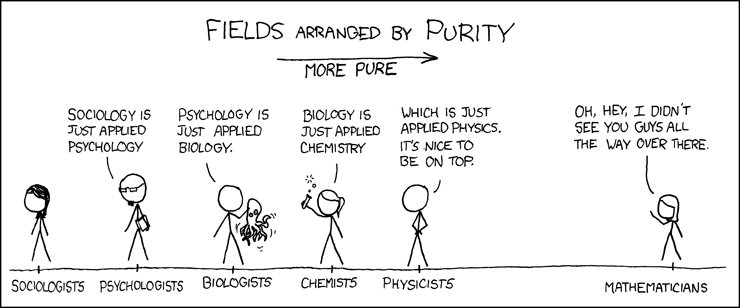
MR:  Yeah, undergraduate computer science is engineering.  Graduate level computer science is math.


From xkcd

As you may have guessed, I'm married to a mathematician.

In addition to being a fan of open source, I also enjoy reading about different scientific disciplines.  I love reading scienceblogs and have read many great books over the past year about evidence based medicine. So when I heard that there was a book available that examined what software engineering practices actually work, I was intrigued.

In any case, I finished reading it recently.   It was very interesting and I learned a lot!  The book is split into two sections.  The first section dealt with different research methods.  For instance,

  • How to conduct a systematic literature review
  • Empirical methods that can be applied to software engineering studies and why software engineering is inherently difficult to measure quantatively.
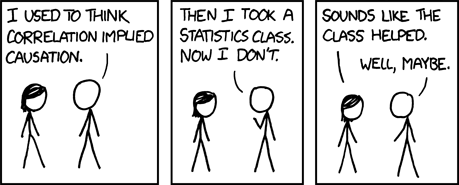
  • How to decide on the papers to include in a meta-study. 

From xkcd

 
The second half of the book examines the evidence for different questions in software engineering.  For instance:

  • How do you measure programmer productivity?  Are some developers really an order of magnitude more productive than their team mates?
  • Does test driven development result in better software?
  • What's the cost of discovering a bug early in the development cycle versus after the product has shipped?
  • What working environment (cubicles/offices/open concept etc) are the most productive for software developers?
  • Is there a measurable difference in software quality between open and closed source software?
  • What are the reasons for the low proportion of women working in the software industry?
  • Does the use of design patterns improve software quality?
  • How do mine data from open source repositories for your own studies (Chapter 27 uses the Eclipse project as an example :-)
All in all, I found it a very interesting book that examined the actual empirical evidence to support or refute some of the sacred cows in software engineering. I think this this is a refreshing step forward for our profession.  If there aren't numbers to support that the way we work is effective, shouldn't we alter our path to use better methods?

    Further reading
    Software Carpentry: Empirical results

    As an aside, some great books on evidence based medicine are
    Bad Science by Ben Goldacre
    Trick or Treatment by Simon Singh and Edzard Ernst
    Snake Oil Science by R. Barker Bausell

      Read more...

      Eclipsing the build

      >> Tuesday, February 08, 2011

      A plan item for 3.7 is to transition the Eclipse and Equinox build process to run on eclipse.org hardware.  Why may you ask, isn't this the case today? Two reasons:

      1.  Until recently, the Eclipse foundation didn't have hardware to support our requirements of running tests on multiple platforms (Windows, Mac, Linux).
      2.  There wasn't a plan item to transition our build to eclipse.org until 3.7.   You may think that we open source developers are happy hippies who have the freedom to work on the bugs that interest them :-). The reality is that I prioritize my bugs as follows:


      I was going to write a post describing the progress migrating to eclipse.org hardware but I thought it would be a good idea to give you some background regarding how the Eclipse and Equinox project's build works today. 

      The Eclipse build creates SDKs for 15 platforms.

      A graphical representation of the 15 platforms we build  (os,ws,arch)

      We use fragments to define platform specific code that is associated with a host bundle.  In some of these fragments, there's C code that needs to be compiled on the platform specific hardware to create binary libraries.  For instance, the SWT and equinox launcher fragments are examples of  these artifacts. We have about seven machines to compile the libraries for these 15 platforms, as some are cross compiled.  The SWT and Equinox team have hudson instances, which connect to all these internal IBM servers, compile the C code, and commit the resulting libraries in binary form to CVS at eclipse.org. This part of the build isn't transitioning to eclipse.org.


      A simplified description of the existing Eclipse build that produces the artifacts that are available for download on eclipse.org is shown below.   Essentially, once a build is launched from cron, the build scripts check out all the code from eclipse.org to the IBM build machine which compiles the bundles. These bundles are copied to eclipse.org to be signed, then copied back to the IBM build machine to be assembled into a p2 repo, from which we create SDKs to run the tests. The zips, repos and test results are rsynced to eclipse.org.


      Once we get the issues worked out with the new Hudson slaves to run tests, all the JUnit tests will run on eclipse.org hardware.  Eventually,  we hope to run the performance tests there once we have sufficient hardware.


      Advantages of moving the build to hudson.eclipse.org
      1. The build process will be more open and other Eclipse and Equinox committers will be able to start a build.  Today, I manage the crontab of the build machine.
      2. Fewer issues with network timeouts due to the fact that the eclipse.org filesystem is local to Hudson.
      3. Hudson has a rich feature set and many plugins to extend it. 

      Disadvantages
      1. Like kindergarten, we'll have to share the filesystem and machines with others.  Today the build runs on dedicated machines and thus we don't have resource constraint issues from other teams.  (The build process itself isn't faster at eclipse.org because of these resource constraints, but the tests are because at the moment we are the only team using the Windows and Mac test machines.)
      2. Can't hack and slash the build on the the command line to rerun a single test suite or restart the build manually.


      In a future post, I'll describe the process to transition our builds to run on eclipse.org and the obstacles that we have overcome.

      How can you help?  Consider donating to Friends of Eclipse. 

      References

      Build at Eclipse.org

      Graphics thanks to open source clip art

      Servers
      Database
      iMac
      Server cabinet
      Tower
      Database

      Read more...

      Implementing shared licenses with 3.7M5

      >> Friday, January 28, 2011

      This is the best Eclipse license I've ever seen.


      Image © chriscardinal, http://www.flickr.com/photos/disatasu/3243844762/ licensed under Creative Commons by-nc-sa 2.0

      Conversely, dealing with license files in Eclipse features is a bit painful.  Today, each time the Eclipse license changes, you need to copy the new license files to your features.  The license files included in the Eclipse SDK are highlighted below:


      These same files are included in the 46 features that the Eclipse and RT Equinox project builds.  This is very tedious to update when the license files change. Lots of copy and paste. The license text also appears in the feature.properties.


      In Eclipse 3.7M4,  the PDE and p2 teams added support for shared licenses.


      The license files will be copied from the license feature to the feature that refers to it.  In 3.7M5, I modified our features to use this shared licenses. For instance, the beginning of the feature.xml for the Eclipse SDK now looks like this:


      To implement this, I followed these steps. 

      1. Create a license feature. This feature doesn't include any bundles or features. It only stores the license files which its build.properties reference.   The feature.properties has only two properties - the licenseURL and license. 

      2. Update the existing features to reference the license feature.  Remove the license files from these features.  Remove the references to the license files from your feature's build.properties.  The values will be inherited from the build.properties of the license feature.  Remove the name and values of licenseURL and license from the feature.properties. These will be included from the license feature. Ensure that you don't have duplicate properties in the feature.properties of the license feature and feature your are updating. This will cause a build failure.


      3.  Update your map files to include to the new feature. You don't need to nest the feature in another feature to fetch it, this happens automatically. For example, this is where our license feature is located

      feature@org.eclipse.license=v20110121,:pserver:anonymous@dev.eclipse.org:/cvsroot/eclipse,,org.eclipse.sdk-feature/features/org.eclipse.license

      4. Run a test build. Fix typos until you have a clean build. Verify that all your features still include the appropriate license files. 

      There isn't an IU for the license feature included in the p2 repository.  The license text is included in the metadata.

      Note that you'll need to build with 3.7M5 bundles.  There was a bug in the 3.7M4 bundles that prevented shared licenses from working in generated source features.

      The advantage of this approach is that when the license files are updated, we'll only need to update the license feature.  We'll also have to increment the versions of the license feature in the referring feature, but that's a simple search and replace. 

      Some other implementation details: I could have also stored the copyright information in the feature.properties of the license feature. However, the copyrights of our features are not identical, so I didn't choose this approach. This may be useful for other teams.

      Thanks to the  PDE and p2 team for implementing this!


      Further references

      Bug 306818 - Improve license support in p2.
      License mechanism description in wiki
      Bug 332662 - Adopt new feature that allows to share the license file

      Read more...

      Revert to an earlier p2 profile from the command line

      >> Monday, January 24, 2011

      Today, we're running builds toward 3.7M5 for the milestone that will be available Friday, January 28.  This morning I updated to our latest integration build from the repository. Unfortunately, one of the bundles had a compile error which was serious enough to cause Eclipse to crash on startup.

      If you want to revert your installation to a previous version, this is easy to do from the UI. Chris describes this here. 

      However, if you can't access the Eclipse UI, reverting becomes a bit more complicated. The online help illustrates how to use the p2 director application to revert your install to a previous profile state.


      The list of profiles available in your Eclipse install are located in your profile registry.  The highlighted profile id below reflects my working installation from last week.


      To revert to this profile, I downloaded a new build, extracted it to a directory and ran the following command

      C:\N20110122-2000\eclipse\eclipsec.exe -application org.eclipse.equinox.p2.director -repository http://download.eclipse.org/eclipse/updates/3.7-I-builds -revert 1295719004390 -destination c:\I20100309-0809\eclipse -profile SDKProfile -bundlepool C:\I20100309-0809 -p2.os win32 -p2.ws win32 -p2.arch x86

      Operation completed in 68759 ms. 

      My install was reverted to the previous profile and I could once again start Eclipse.

      Read more...

      Hudson best practices and Eclipse

      >> Wednesday, January 19, 2011

      One of the plan items for Eclipse 3.7  I've assigned is to migrate the Eclipse and Equinox build to run on the Hudson installation at eclipse.org.  So I've spent a lot of quality time with Hudson lately. (Soon to be called Jenkins).

      Today, I attended a webinar about optimizing Hudson in production hosted by Kohsuke Kawaguchi of CloudBees. Since my handwriting is similar to the last slide in this Oatmeal cartoon, I thought it would be better to jot my notes down in a blog post. As I was listening to his suggestions, I thought about how his seven best practices apply to our use of Hudson at Eclipse.


      1. Backups 
      • Backup your Hudson install to protect from disaster and accidental configuration changes.
       

      Image © davemorris, http://www.flickr.com/photos/davemorris/2395980976/sizes/z/in/photostream/   licensed under Creative Commons by-nc-sa 2.0 

      • $HUDSON_HOME on the master stores everything that needs to be backed up. The slaves doesn't need to be backed up.
      • Live backups are fine as configuration changes are atomic
      • In addition to the backup of the configuration, a backup of the filesystem is necessary to provide consistent snapshot.
      • Backups are great but can you restore?  On a regular basis, try restoring your hudson configuration and starting up a test hudson instance with the restored hudson.war file.
      2. Disk
      • Prepare for disk utilization growth
      • Space is more important than speed when ordering new drives
      • Plan for expandable disk volumes
      • If it's too late, symlink is your friend


      3.  Use native packages
      • For instance, *.deb, *.rpm.  Easy to update and install, and they include init scripts.
      • Configuration is stored in /etc/default/hudson and /etc/sysconfig/hudson
      • Existing $HUDSON_HOME can be migrated
      • Native Windows package is a work in progress
      @Eclipse:  Backups and disk configuration are managed by the webmasters, along with upgrading and installing hudson.


      4. Distributed builds

      • You will grow beyond a single system
      • Increasing load on a single machine is not the only issue
      • It's cheaper to grow horizontally (additional machines) versus vertically (more memory and CPUs on a single machine)
      • It's also good to have isolation between build processes in case you want to diversify the test and build platforms
      • Let master launch slaves via SSH or DCOM. This makes it easier to keep the cluster up and running.
      • SSH public key authentication makes it easy to connect to slaves on disparate platforms.

      @Eclipse: Yes, we have distributed builds and several platforms available for test purposes.

      5.  Labels

      Treat build machines like livestock, not like pets


      Image © davegroth, http://www.flickr.com/photos/davegroth/9107888/sizes/m/in/photostream/   licensed under Creative Commons by-nc-sa 2.0 

      • Build machines should be interchangeable
      • Don't tie builds to a specific build machine,  unless there are platform limitations. This approach will yield better resource utilization and less downtime.  Queued builds can use the next available machine instead of waiting for a specific machine.
      • When using labels for your Hudson slaves, name them to reflect their capability.  For instance, if the slave is Mac or Windows hardware, the label should reflect this.
      • If  there is a real reason to limit build to run on a single machine (such as wanting to run platform specific tests), tou can use boolean expressions with labels.  For instance, this Hudson job shouldn't run the slaves running Mac or Windows
      @Eclipse: We use label our build machines as livestock.  No pets for us. However, I'm quite envious that the Mozilla foundation has adopted red pandas (firefoxes).

        6.  Invest in a good URL
      • By default Hudson runs on port 8080.  This is difficult for users to remember.
      • Use the host's alias instead of the machine name.  Thus if the machine names changes, the users won't have to go to a new URL.
      • Share port 80 with other applications using Apache reverse proxy with which will also allow you to run Hudson as a non-root user.   
      @Eclipse: https://hudson.eclipse.org is short and simple.
        7.  Try to keep the build records under control.

        • Discard old build records if you can
        • Removing old builds reduces start-up time and memory usage. 
        • Settings are on a per-project basis. For instance, here are settings for one of my Eclipse builds.

        @Eclipse: Yes, we do clean up old builds. Also, the webmasters have created a cron job to send a friendly email every week listing of the Hudson disk utilization to remind the release engineers to clean house.

        The slides are available here and obviously provide a lot more detail than my short summary.  If you're interested the best practices for configuring Hudson for a production environment that has room to grow, this presentation is provides very useful suggestions.

        Read more...

        Smashing open source stereotypes

        >> Friday, January 14, 2011

        The Wall Street Journal published an article yesterday where it described the open-source software movement, whose activists tend to be fringe academics and ponytailed computer geeks. This is one of the many unfortunate stereotypes surrounding open source that I've heard over the years.   Let's break some of those down.


        1.  Open source is a fringe movement.

        Open source builds mainstream software. I work all day long contributing to open source software, as do many of my colleagues.  Why do corporations pay us to contribute to software that doesn't have a price tag?  It's in their self-interest to have employees improving the open source software that underlies their commercial offerings.  Here are some of the fringe groups involved in Eclipse.


        Source: Eclipse Foundation Members' Meeting  Q4 Update December 16, 2010

        These unknown companies are members of the Linux foundation.


        2.  Open source is not professional.

        At Eclipse, we ship our software on time every year.  We've done that for seven years.  That's professional.


         Source: Ian Skerrett: The Helios Train has arrived


        3.  Open source contributors are loners sitting in their parents' basement working on arcane bugs.

        Nope.  Open source is very social.  We interact on IRC and twitter.  We attend democamps, learn about new projects and build new businesses. We speak at conferences. The software we work on makes a difference in the world. It helps monitor robots on Mars, manages trains in Switzerland and models chemical reactions.


        Source: Madhu Samuel: Eclipse Democamp Bangalore 2010

        4.  Open source developers aren't in good physical condition and don't have interests outside of work

        Again, a stereotype that has been proven wrong.    We ran 570K at EclipseCon 2010. 


        Open source contributors run marathons, bike, curl, swim and play soccer or  hockey.  In fact, you can order an Eclipse bike shirt.


        We also volunteer at schools and raise money for charity. 

        5.  Open source contributors are always male.


        Source: Miriam Ruiz: Women in Free Software

        Wrong again. 

        We may be a small minority, but here's hoping that these fine female role models will inspire a younger generation of women to consider the amazing career opportunities that open source has to offer.  Two generations ago, female doctors were rare.    Today, women are over 50% of new Canadian medical school graduates. So, may borrow a phrase from a recent campaign, it will get better.

        What other open source stereotypes would you like to smash?

        Read more...

        Thoughts on Being Geek

        >> Wednesday, January 05, 2011

        Sitting on the plane travelling to Nova Scotia for the holidays, I read Being Geek: The Software Developer's Career Handbook by Michael Lopp. I've wanted to read this for a while so I was happy to finally have some time to do so.

        It was a very informative and funny book, especially for someone like me who has spent a long time working in the software and IT services industry. Some key points it covered:
        • You are responsible for your career. Don't depend on your manager or HR. They are looking out for their own interests.
        • The importance of mentoring and having a career plan.
        • How to negotiate your salary and benefits for a new job, and how this calculation should be altered if you are looking to move to a start-up versus an established company.
        • Evaluating organizational culture outside the boundaries of hierarchy.  Where is the informal power  within an organization?
        •  I really liked the chapter entitled "Your People" on the art of networking and the importance of connecting with people in your community face-to-face and getting to know them better.  As I read this I thought, my people are the Eclipse family. 
        • Strategies for dealing with different types of managers and co-workers.
        • How to decide if you want to be a manager.
        • Dealing with a crisis situation such a major bug just before the ship date.
        • The downsides of working in our industry.

        As an Eclipse committer, this quotation from the chapter on selecting the tools to use as a developer made me laugh.

        "Yeah, I know all about the glory of integrated debugging, and I see all you Eclipse guys having a ball, but what I have found in many years of developing is that embracing fancy tools means tinkering with tools to get them to behave how you want."

        -Michael Lopp, Being Geek
        There's something to be said for simplicity.

        My only criticism about this book is that the example software developers in the book were overwhelmingly male.  There were very few female software developers if any used to as characters in his stories. Legend has it that they do exist.  All the examples of women in the book seemed to be in product marketing or similar roles.

        Anyways, if you are interested in a thought provoking book about strategies for managing your software career this is definitely a good one.

        Read more...

        Get your bundles back

        >> Monday, December 06, 2010

        I tried to update to the latest  integration build last week.  I couldn't because I had accidentally updated to a nightly build at some point. This problem wouldn't happen to most users because only the Eclipse and Indigo repositories are defined by default in the SDK.   I have many repositories defined in my install because I'm always testing bugs in different test repos.

        Some background:

        Eclipse bundles have four part version numbers. Major.minor.service.qualifier. With a nightly build,  the qualifiers of all our bundles is replaced with the build id.  For example, here's a subset of the bundles from a recent nightly build. Note the qualifier is always N20101201-2000.


        With an integration build, the qualifier of the bundle reflects the CVS tag that the developer submitted to the  map file.  Looking at at subset of bundles from the latest integration build, note that the p2.garbagecollector bundle has a qualifier of v201011-2100. 


        Since the first three segments of the bundle's version match, and N > v,  the bundles from the nightly build always sort higher. This caveat also extends to the IU of the product id, in my case, the org.eclipse.sdk product id.  Since I had accidentally upgraded to a nightly build, I couldn't update to any future integration builds because it's bundles will always sort lower.


        No problem, I thought.  I'll just revert to an earlier install.  That's one of the many things that I love about p2.  Because p2 stores your previous profiles in the profile registry, you can revert to a previous state of your installation.

        What's a profile? A profile contains properties defining the “environment” such as operating system, windowing system, architecture and install location.  It also contains the list of IUs and the properties associated with each IUs.  Artifacts are the actual content being installed (bytes).  Metadata consists of Installable units (IUs) that describes the content that can be installed.  Profiles are held by a profile registry which can store many profiles.

        I tried to revert to a previous build.  Error- Cannot find bundles in repository.  Hmm, it appeared that p2 had garbage collected the old bundles in my install and was looking in my defined repositories for the bundles.   Ironically, I had recently cleaned up our integration builds repo so that we weren't consuming so much space on the eclipse.org servers. So the bundles I needed to revert to were nowhere to be found.

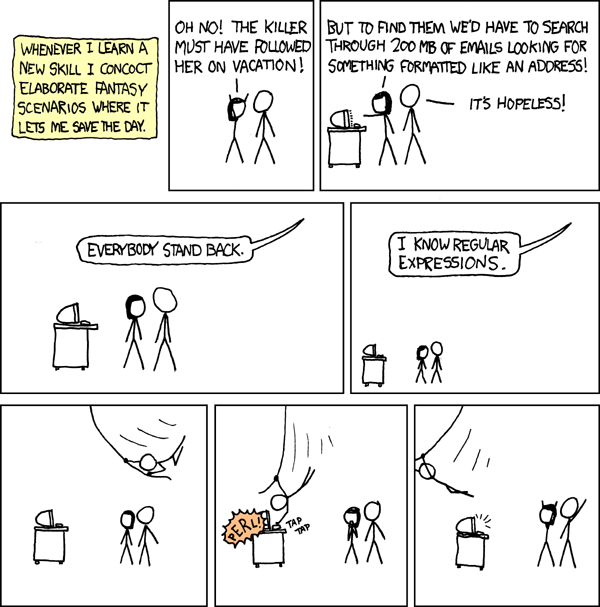
        I didn't really want to roll back to an even earlier build. And I wanted to be able to update to newer integration builds.  (My eclipse install dates to March 2009 and I've been updating it since then without an issue). Since I'm the Eclipse project release engineer, my solution was to rerun the missing build locally and recreate those exact same bundles on my local linux server.  Reproducible builds are essential.  We tag the builder and map files each build so that the builds can be run again and create the same binary bits.  I wrote a little shell script to use the versions of the map files and builder that were use to create that build. Ran the build. Added the temporary repo to my install and tried to revert again.  I was feeling pretty confident that this would work, or to paraphrase xckd, "Watch out, I know release engineering". 


        No.  Could not revert.  It turns out that I had also been using an  integration build of Mylyn which had also been cleaned from their repo.  So I had to revert to an earlier Eclipse milestone build before I had installed Mylyn, then update to the latest SDK I-build and re-install Mylyn.

        In conclusion
        1. You can selectively update part of your install, but cannot selectively revert.  Reverting to a profile state is an all or nothing deal.
        2. Regular expressions are better than release engineers.

        Further reading

        OSGi semantic versioning
        Eclipse Version Numbering
        p2 tutorial
        CRISP builds
        p2 garbage collection

        Read more...

        Building Open Source: the Backstory

        >> Friday, December 03, 2010

        Last week, I wrote a post that compared the Eclipse and Mozilla build infrastructure.   It was surprised by the interest it generated.  My conclusion? People like to learn about complex build systems and scalability. Shiny hardware doesn't hurt either.  At the same time, I was also thinking about what would make an interesting proposal to submit to EclipseCon.  

        In the midst of the mundane task of rebooting a performance machine in the lab, I was inspired.  Wouldn't it be interesting to open the door into a larger set of open source communities? To explore how they manage their build and release processes, hardware, software and the underlying technologies they use to transform source into binaries?


        Image © criggchef, http://www.flickr.com/photos/criggchef/2665328223/   licensed under Creative Commons by-nc-sa 2.0


        At Eclipse, sometimes we tend to limit ourselves to examining the projects within the Eclipse ecosystem itself as benchmarks for comparison.   Other open source foundations, such as Mozilla, Gnome, Linux and Apache, have similar challenges.   Do they have a centralized build farm?  How do they support multiple streams, platforms and SCMs? How do they manage hardware and parallelize enormous test suites? What CI engine do they use? Why? How do they optimize their build processes to support their community's goals?  I think the open source build backstory would expose some interesting ideas to the Eclipse community.


        Image of  Toronto Reference Library © Andrew Louis, http://www.flickr.com/photos/hyfen/3562200168/  licensed under Creative Commons by-nc-sa 2.0

        You may be thinking, "Kim, you're an Eclipse release engineer.  What do you know about builds at other open source foundations?"   The beautiful thing about open source is that it is full of passionate people who love to talk about their work. And by virtue of its open nature, we are free to discuss and learn from others.  I'm confident that I could create compelling content by talking to other release engineers to tell the story behind their builds. 


        Image of Thomas Fisher Rare Books Library, Toronto © Andrew Louis, http://www.flickr.com/photos/hyfen/3562167028/ licensed under Creative Commons by-nc-sa 2.0

        There are certainly a lot of fantastic talks proposed for EclipseCon this year.  If you're interested in this talk, please express your interest on the EclipseCon proposal. Thank you for your consideration!

        Read more...

        Mozilla versus Eclipse build infrastructure

        >> Tuesday, November 23, 2010

        The Mozilla foundation is similar to the Eclipse foundation in many ways.  However, it has a wholly owned non-profit subsidiary, mozilla.com, which has a sizeable engineering and marketing staff
        that work on the Mozilla projects themselves. The Eclipse foundation's revenue comes from membership dues from member companies. Much of Mozilla's revenue stream arises from search functionally embedded in Firefox that generates cash flow from companies such as Google, Amazon, Yahoo and eBay.  Of course, Mozilla projects provide more general desktop tools, than the specialized tools we provide at Eclipse, so they have a larger user base.

        A while ago, I watched a webinar regarding the Mozilla build process.


        It has some interesting numbers. Today, Mozilla has

        • 12 release engineers
        • 17 platforms to support
        • 12 branches to build from
        • 1200 build and test machines
        • 3 colos


        Each of their builds consumes 12.40 hours of build time, 54.48 hours of test time and 2.79 days of CPU time. Because of the enormous resources that the build consumes, they run a lot of tests in parallel. With 1200 machines you can do that :-)


        They also run many performance tests with each build. Since the hardware must be identical to compare performance results across machines,  350 of 1200 machines are Mac minis.  It's the lowest common denominator for hardware that can run on Mac, Windows and Linux operating systems.  In addition, they have a small footprint in a colo, and are relatively inexpensive.

        Mozilla's many Mac minis

        At Eclipse we have,

        The Eclipse project builds for 15 different platforms but we only run JUnit tests on three.   We don't have the hardware to run tests on all of them.  Windows, Mac and Linux are represent the vast majority of users and many of the platforms have low download numbers.  The SWT team tests all 15 platforms a few times a milestone and ensure that they start up and work as expected.

        The build scheduling engine they use at Mozilla is Buildbot, where we use Hudson on eclipse.org servers.  Their build process used to take ten days to make a release available.  This wasn't really acceptable.  Mozilla have what they call "zero day" or "chem-spill releases" where they must prepare a release in a single day to address a critical issue.  This is really an admirable feat.  During the Callisto release, I recall having to stay up all night to ensure a build completed to ensure a critical fix was available for the release train the next day.  I'm not sure that with the size of the Eclipse release train today, a zero day release would be possible if a lower level project had to be rebuilt.

        Mozilla also run tests on a number mobile devices. To reduce interference between these devices, they are stored in an IKEA shoe closet in the colo.


        It's interesting to see how other open source organizations manage their builds.  How do you see the build infrastructure evolving at Eclipse?

        Read more...

        Number Nine: Happy Birthday Eclipse!

        >> Sunday, November 07, 2010

        This weekend,  the time changes in many regions of North America, to allow more sunlight into our darkening days.


        Image © Brandon Christopher Warren, http://www.flickr.com/photos/brandoncwarren/4334456172/  licensed under Creative Commons by-nc-sa 2.0


        Sunday November 7th, 2010 marks the ninth anniversary of the Eclipse 1.0 release.   Happy birthday Eclipse! I'm always amazed at how much we have accomplished as a community.


        Image © Rob J Brooks, http://www.flickr.com/photos/robbrooks/3301757153/ licensed under Creative Commons by-nc-sa 2.0

        Last year the Apache Software Foundation, celebrated their tenth birthday with cake.  That's too low key for us.  Rumour has it there will be dancing and democamps this month.  


        Read more...

        At Eclipse we ship, we don't slip

        >> Wednesday, June 23, 2010

        Software development is a discipline famous for missing deadlines.  Not at eclipse.org.

        We ship.


        Image © One Hill Tree Studios, http://www.flickr.com/photos/onetreehillstudios/3743874473/  licensed under Creative Commons by-nc-sa 2.0

        We don't slip.


        Image © Carina Ice http://www.flickr.com/photos/carinaice/4689720312/  licensed under Creative Commons by-nc-sa 2.0 

        Congratulations to all the Helios participants whose worked so very hard over the past year to make this release a success.  For the Eclipse Project, this represents nine years of shipping at the end of June. Helios also represents the fifth coordinated release for the Eclipse foundation.  This is an amazing accomplishment!  I hope that you can all enjoy some time to relax over the summer months.


        Image © Royce Bair http://www.flickr.com/photos/ironrodart/4290027967/  licensed under Creative Commons by-nc-sa 2.0 

        For those of you who don't need a break, our builds toward 3.6.1 start tomorrow morning :-)

        Read more...

        How to explain open source to your family

        >> Friday, June 18, 2010

        I've had the following conversation several times in my life. While meeting a new person at a party, or catching up with a relative that I haven't seen in a while.

        Q. So Kim, what do you do for a living?
        A. I work at IBM where I spent most of my time working on a open source project called Eclipse.

        Q. Open source? Isn't that where they give away software for free? How do you make money off of that?
        A. Well, IBM makes products based on this open source software. It's an advantage to have people involved in the open source community and working on improving the software they consume for their products.

        Q. So you get paid to give away your work for free?
        A. Yes.

        Q. What does this open source software do?
        A. Well, it's used by other people to write more software.

        Awkward pause.

        At this point, I often wish that I had lied and told them that I'm a vet. Because everyone loves puppies.


        Image by gareso14

        Anyways, I saw the most excellent link cross my twitter feed last night from the Open Source Business Resource that explains why we work in open source in a very funny and accessible way.

        video: Paul Ramsey explains to his mother in-law why career in #opensource is not as insane as it appears #osgeo http://ht.ly/1ZZFL


        The video "Beyond Nerds Bearing Gifts: The Future of the Open Source Economy" has bunnies, evil geniuses and swordplay. It compares open source software with evolutionary biology to illustrate the advantages of a corporation investing in open source. I highly recommend taking the time to watch it. (There's 30 second commercial at the beginning).

        Read more...

        Ottawa Helios Celebration

        >> Wednesday, June 16, 2010

        In celebration of the Helios release, some eclipse committerati and Eclipse foundation staff will be meeting for lunch next Wednesday eclipse family from the Ottawa area are invited to meet for lunch next Wednesday*. Here are the details:


        Marshy's Bar and Grill, 117 Centrepointe Drive, noon, Wednesday June 23


        Image by claudmey


        Food, beer and eclipse family, what could be better? Helios is a tremendous accomplishment, let's celebrate! The software is free, but there isn't free lunch so please bring your wallet :-) Let me know if you plan to attend in the comments, so we can adjust the number of people in the restaurant reservation. See you there!


        *I changed the introduction to be more inclusive. Denis told me that it sounded like I was excluding people. That certainly wasn't my intention but I'm a release engineer, not a wordsmith. I always listen to what Denis says :-)

        Read more...
        Bundles and Oranges: Dare to Compare

        >> Friday, May 28, 2010

        Equinox p2 provides several tools to manage repositories.


        Image by Oliver Delgado


        The mirroring task is used extensively in the Eclipse and RT Equinox build.  Mirroring a p2 repository allows you to copy the metadata and artifacts to a new location. You can mirror your entire repository or a subset of IUs to a new location. We call mirroring a subset of IUs slicing.


        Image by Safari11

        The granularity of your slicing operation is dependent on the IUs you specify.


        Image by shin0


        We run the mirroring task with a comparator.  This allows us to compare the bundles that have just been built with the bundles that already exist from other builds in the composite repository. We want to guarantee that the bundles with the same unique identifier and version have the same binary content.   Do you know which of or your bundles is not like the other?


        Image by Stephanie Berghaeuser

        A different compiler with the same source could produce different byte code. Using a new builder can change the content of your bundles, for instance if you enable source references.

        We use a comparator with a baseline to compare the bundles with the same name and id available in our repositories with the ones that were just created in the current build.  Newer bundles with the same id and version are discarded.   This process guarantees that if a user installs a build from a repository or a zip, they will have the same bundles in their install. Otherwise, you risk inconsistent bundles for your users.  Not good.

        We call the p2.mirror task like this:


        We are mirroring from the source (unzipped repository of our build time feature containing all features and plugins in the build) to the child repository location.  The IgnoreErrors flag is set to true so the mirroring operation doesn't fail if there are differences. The org.eclipse.equinox.p2.repository.tools.jar.comparator is used to compare the bundles between the two locations and output the differences to a log.  The repository location or baseline is the existing composite repository with content from older builds.   The  comparatorLog is parsed by a JUnit test which generates a failure if the log indicates differences. You can also exclude certain bundles from being compared, as you can see in the exclude stanza.

        Other information on p2 repository tools and the comparator
        Bug 302283 - add ability to exclude bundles when running comparator with mirror task
        Bug 312962 - Exclude doc bundles from comparator
        Implementing composite repositories in your build
        Slicing and dicing the p2 way
        Andrew's comparator slides from EclipseCon 2009


        Hey Kim, what's with all the oranges?  I'm very fortunate that I have the opportunity to run my first marathon with my friends on a beautiful course in Ottawa and Gatineau this Sunday.  It will be a challenge. After the race, there will be sweet orange slices in the recovery area for the 39,000 people running in Ottawa this weekend.

        Read more...

          © Blogger template Simple n' Sweet by Ourblogtemplates.com 2009

        Back to TOP